Sunday, May 26, 2013

How to Use PRG Pattern with ASP.net MVC 4 ?

What is the PRG Pattern ?

  • PRG stands for "Post/Redirect/Get"
  • Instead of returning an HTML page directly,
  • The POST operation returns a redirection command (using the HTTP 303 response code (sometimes 302) together with the HTTP "Location" response header),
  • Instructing the browser to load a different page using an HTTP GET request
  • The result page can then safely be bookmarked or reloaded without unexpected side effects

How to Explain this by using an Example ?

  • Here I'm going to use User Registration function as an example
  • If the Registration attempt is Successful, the user should be redirected to his Home page
  • Otherwise they should be redirected back to the Registration page

Image 1 : Shows Action Methods Interaction When do Registration
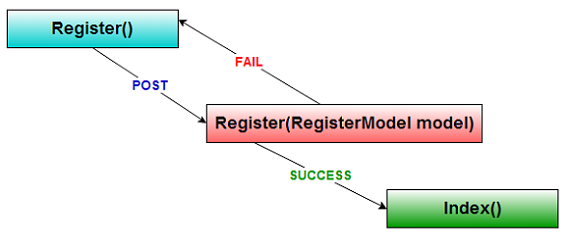
Shows Action Methods Interaction When do Registration


AccountController.cs        
        
Code for the Register Action Method (Get) for Displaying Register View is as below

Complete project        /// <summary>
        /// for displaying Register View
        /// </summary>
        [HttpGet]
        [AllowAnonymous]
        public ActionResult Register()
        {
            return View();
              }


      Image 2 : Register View

Register View

        
Code for the Register Action Method (Post) for Processing the Registration and Shows Register Page again is as below

        /// <summary>
        /// for Registering the User
        /// </summary>
        [HttpPost]
        [AllowAnonymous]
        [ValidateAntiForgeryToken]
        public ActionResult Register(RegisterModel model)
        {
          if (ModelState.IsValid)
          {
            // Attempt to register the user
            try
             {
               WebSecurity.CreateUserAndAccount(model.UserName, model.Password);
               WebSecurity.Login(model.UserName, model.Password);
               ViewBag.Message = "Successfully Registered!";
               return View(model);//PRG has not been Maintained
             }
              catch (MembershipCreateUserException e)
             {
                 ModelState.AddModelError("", ErrorCodeToString(e.StatusCode));
             }
          }
            // If we got this far, something failed, redisplay form
            return View(model);
        }


    Image 3 : New user has been Created

New user has been Created

        
  • At this point If you try to Refresh (F5) or Reload the Page,You'll see below mentioned kind of Security Alert Message Box

      Image 4 : Register form with "Confirm Form Resubmission" Message Box
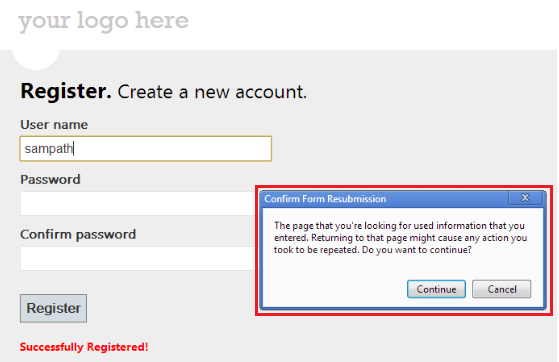
        Register form with "Confirm Form Resubmission" Message Box


  • After that If you try to press "Continue" Button, You'll see below mentioned Run time exception
  • But for another situation this may be Data Duplication issue etc.

      Image 5 : Run time Exception

Run time Exception


How to Get Rid Of this Issue ?

  • You have to maintain PRG Pattern with your Return type, After finishing the Successful Registration
  • To properly perform PRG you must return a redirecting ViewResult from your Action
  • Such as RedirectToAction, otherwise you'll get the dialog box pictured above (i.e. Image 4)

Code for the Properly Perform PRG Pattern is Maintaining Register Action Method is as below

    /// <summary>
    /// for Registering the User
    /// </summary>
    [HttpPost]
    [AllowAnonymous]
    [ValidateAntiForgeryToken]
    public ActionResult Register(RegisterModel model)
     {
      if (ModelState.IsValid)
      {
       // Attempt to register the user
       try
       {
         WebSecurity.CreateUserAndAccount(model.UserName, model.Password);
         WebSecurity.Login(model.UserName, model.Password);
         
         return RedirectToAction("Index""Home");//PRG has been Maintained
        }
        catch (MembershipCreateUserException e)
        {
          ModelState.AddModelError("", ErrorCodeToString(e.StatusCode));
        }
      }
       // If we got this far, something failed, redisplay form
       return View(model);
     }


       Image 6 : Home page

Home page


That's It.You're Done.

Download


Conclusion

  • You saw that, by implementing the PRG pattern, You could have nice clean urls that are bookmarkable
  • Users of your web application also get a nice site that is traversable and aren't presented with confusing security dialog messages
  • So as a Best Practice, You must always try to use PRG pattern with your Post Action methods

I hope this helps to You.Comments and feedback greatly appreciated.

If you feel it was a good article,Give me a +1.Thank You.


You Might Also Like

Saturday, May 18, 2013

Top 10 New Features in ASP.net MVC 4

What is New in ASP.net MVC 4 ?

Feature 1 : ASP.net Web API

      What is ASP.net Web API ?

  • A New framework for creating HTTP services
  • That can reach a broad range of clients including browsers and mobile devices
  • Web API is also an ideal platform for building RESTful services

Feature 2 : Enhancements to Default Project Templates

  • The Template that is used to create new ASP.net MVC 4 projects has been updated to create a more modern-looking websites

Enhancements to Default Project Templates

  • In addition to cosmetic improvements, there’s improved functionality in the new template
  • The Template employs a technique called Responsive Design to look good in both desktop browsers and mobile browsers without any customization

mobile browsers without any customization


How to See Responsive Design in Action ?
  • You can use a mobile emulator or just try re-sizing the desktop browser window to be smaller
  • When the browser window gets small enough, the layout of the page will change

What is Responsive Web Design (RWD) ?
  • Is a web design approach aimed at crafting sites to provide an optimal viewing experience
  • Easy reading and navigation with a minimum of re-sizing  panning, and scrolling across a wide range of devices (from desktop computer monitors to mobile phones)

Feature 3 : Mobile Project Template

  • If you’re starting a new project and want to create a site specifically for mobile and tablet browsers
  • Then you can use the new Mobile Application project Template
  • This is based on jQuery Mobile, an open-source library for building touch-optimized UI
  • This template contains the same application structure as the Internet Application template and the controller code is virtually identical
  • But it's styled using jQuery Mobile

Mobile Project Template


styled using jQuery Mobile


Feature 4 : Display Modes

  • Lets an application select views depending on the browser that's making the request

For example :
  • If a desktop browser requests the Home page, the application might use the Views\Home\Index.cshtml template
  • If a mobile browser requests the Home page, the application might return the Views\Home\Index.mobile.cshtml template
  • Layouts and Partials can also be overridden for particular browser types

That is :

Layouts :
  • If your Views\Shared folder contains both the _Layout.cshtml and _Layout.mobile.cshtml templates,
  • Then by default the application will use _Layout.mobile.cshtml during requests from mobile browsers and _Layout.cshtml during other requests

Partials :
  • If a folder contains both _MyPartial.cshtml and _MyPartial.mobile.cshtml,
  • The instruction @Html.Partial("_MyPartial") will render _MyPartial.mobile.cshtml during requests from mobile browsers, and _MyPartial.cshtml during other requests

Feature 5 : jQuery Mobile and Mobile Features


  • The jQuery Mobile library provides a user interface framework that works on all the major mobile browsers
  • jQuery Mobile applies progressive enhancement to mobile browsers that support CSS and JavaScript
  • Progressive enhancement allows all browsers to display the basic content of a web page, while allowing more powerful browsers and devices to have a richer display
  • The JavaScript and CSS files that are included with jQuery Mobile style many elements to fit mobile browsers without making any markup changes
  • You can install the jQuery.Mobile.MVC NuGet package, which installs jQuery Mobile and a view-switcher widget


Feature 6 : Task Support for Asynchronous Controllers

  • You can now write asynchronous action methods as single methods that return an object of type Task or Task<ActionResult>

Feature 7 : Azure SDK

  • ASP.net MVC 4 supports the Newer release of the Windows Azure SDK 2.0

Feature 8 : Database Migrations

  • ASP.net MVC 4 projects now include Entity Framework 5
  • One of the great features in Entity Framework 5 is support for database migrations
  • This feature enables you to easily evolve your database schema using a code-focused migration while preserving the data in the database

Feature 9 : Bundling and Minification

  • The bundling and minification framework enables you to reduce the number of HTTP requests
  • That a Web page needs to make by combining individual files into a single,
  • Bundled file for scripts and CSS
  • It can then reduce the overall size of those requests by minifying the contents of the bundle

What is Minifying ?
  • Minifying can include activities like eliminating white space to shortening variable names to even collapsing CSS selectors based on their semantics

How to Handle Bundles ?
  • Bundles are declared and configured in code and are easily referenced in views via helper methods
  • Which can generate either a single link to the bundle or,
  • When debugging, multiple links to the individual contents of the bundle

Feature 10 : Enabling Logins from Facebook and Other Sites Using OAuth
                            and OpenID

  • The default templates in ASP.net MVC 4 Internet Project template now includes support for OAuth and OpenID login using the DotNetOpenAuth library
  • It's on App_Start ==> AuthConfig.cs File


Do You Have Any Problem or Things to Share about ASP.net MVC 4 ?

MVC 4 on Linkedin


Conclusion
  • You can see that lots of new and awesome features have been added to the ASP.net MVC4
  • So, use them and enjoy it

I hope this helps to You.Comments and feedback greatly appreciated.

If you feel it was a good article,Give me a +1.Thank You.


Happy Coding.

Saturday, May 4, 2013

How to Use enum with Entity Framework 5 ?


What is enum ?
  • The enum keyword is used to declare an enumeration
  • A distinct type consisting of a set of named constants called the enumerator list
  • Every enumeration type has an underlying type
  • The default underlying type of the enumeration elements is int
  • By default, the first enumerator has the value 0
  • And the value of each successive enumerator is increased by 1
  • EF 5 enum can have the Types as  Byte, Int16, Int32, Int64 or SByte

Let's Take a Simple Example

E.g. 1 :

enum Days {Sat, Sun, Mon, Tue, Wed, Thu, Fri};

In this enumeration, Sat is 0, Sun is 1, Mon is 2, and so forth

E.g. 2 : Enumerators can have initializers to override the default values

enum Days {Sat=1, Sun, Mon, Tue, Wed, Thu, Fri};

In this enumeration, the sequence of elements is forced to start from 1 instead of 0


How to Use enum with Entity Framework 5 Code First ?
  • This feature is Latest improvement of EF 5

Step 1 : Open Visual Studio 2012

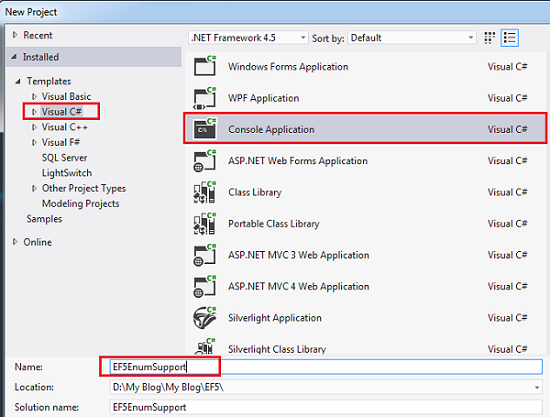
Step 2 : File ==> New Project as EF5EnumSupport

New Project as EF5EnumSupport


Step 3 :  Right Click Your Solution and then Click Manage NuGet Packages... 


Manage NuGet Packages


Step 4 : Click Online Tab and Then Type Entity Framework 5 on Search Box
            After that Select EntityFramework and Click Install 


Select EntityFramework

Step 5 : Click I Accept


Click I Accept


After the above Step, below mentioned DLLs (Red Color)  have added to the Project


DLLs (Red Color)  have added to the Project


Step 6 : Add ==> New Class and make it as enum Type Course

Course.cs
Complete project
 namespace EF5EnumSupport.Models
 {
    public enum Course
    {
        Mcsd = 1,
        Mcse,
        Mcsa,
        Mcitp
    }
 }

Step 7 : Add ==> New Class as Student

Student.cs

 namespace EF5EnumSupport.Models
 {
    public class Student
    {
        public int Id { get; set; }
        public string Name { get; set; }
        public Course Course { get; set; }
    }
 }

Step 8 : Create DbContext derived Class as StudentContext

StudentContext.cs

 using System.Data.Entity;

 namespace EF5EnumSupport.Models
 {
    public class StudentContext : DbContext
    {
        public DbSet<Student> Students { get; set; }
    }
 }

Step 9 : Console application's Main Method is as below

Program.cs

using System;
using System.Linq;
using EF5EnumSupport.Models;

namespace EF5EnumSupport
{
  public class Program
  {
     static void Main(string[] args)
     {
       using (var context = new StudentContext())
       {
        context.Students.Add(new Student { Name = "Sampath Lokuge",
                                           Course = Course.Mcsd });
        context.SaveChanges();

         var studentQuery = (from d in context.Students
                             where d.Course == Course.Mcsd
                             select d).FirstOrDefault();

         if (studentQuery != null)
          {
           Console.WriteLine("Student Id: {0} Name: {1} Course : {2}",
                            studentQuery.Id, studentQuery.Name,
                            studentQuery.Course);
           }
         }
     }
  }
}

The brand new enum support allows you to have enum properties in your entity classes

enum properties in your entity classes


Step 10 : Run the Console Application
               
               DEBUG ==> Start Without Debugging (Ctrl + F5)

Run the Console Application


Step 11 :  Where's the Database ?
  • By default the database will be created on the LocalDB instance
  • The Entity Framework names the database after the fully qualified name of the derived context
  • i.e. EF5EnumSupport.Models.StudentContext

    SQL Server Object Explorer in Visual Studio 2012 is as below 

     
    SQL Server Object Explorer in Visual Studio 2012
 
          View Data on Students Table

View Data on Students Table

      
    What is LocalDb ?
  • Microsoft SQL Server 2012 Express LocalDB is an execution mode of SQL Server Express targeted to program developers
  • LocalDB installation copies a minimal set of files necessary to start the SQL Server Database Engine                        

That's It.You're Done.

DownloadEntity Framework 5


Conclusion
  • Entity Framework 5 brings a number of improvements and enum Support in Code First is one of them
  • You can see that when you use enum type with your model class, Visual Studio 2012 gives  intellisense support out of the box
  • It's really awesome new feature of the Entity Framework 5
  • Enjoy it

I hope this helps to You.Comments and feedback greatly appreciated.

If you feel it was a good article,Give me a +1.Thank You.


Happy Coding.


Another Article about Entity Framework 5

What is New in Entity Framework 5 ?