Monday, March 25, 2013

How to Find jQuery Errors in JS File ?

What is JSHint ?
  • It's a Tool to detect errors and potential problems in JavaScript code
  • Can be used to enforce coding conventions
  • Simple Tool that can very often spot your mistakes before you do
  • It can save you from a lot of tedious debugging
  • Lets you re-factor JavaScript code with greater confidence
  • It's reduces the chances of you deploying broken code to your production server

What does JSHint  do ?
  • It identifies definite, objective errors in your code
  • Such as mistyped keywords, mistyped variable names, mismatched parentheses, and other syntactical slip-ups
  • It enforces some basic code style consistency rules
  • Such as No trailing white space, no use of the == operator, etc.
  • Depending on how you configure JSHint  

How to Integrate JSHint with Visual Studio 2010 ?

Step 1. Open Visual Studio 2010

Step 2. Click  Tools  ===> Extension Manager

Extension Manager


Step 3. Click "Online Gallery" Button

Click "Online Gallery" Button

Step 4. Type "jslint" inside the Search box


Type "jslint" inside the Search box


Step 5. Click "Download" Button

Click "Download" Button


Step 6. Click "Install" Button

Click "Install" Button


Step 7. Click "Restart Now" Button for Restart Visual Studio 2010

Click "Restart Now" Button for Restart Visual Studio 2010


That's It.You're Done.


How to Configure JSHint  ?

Step 1. Click  Tools  ===> JS Lint Options... on Visual Studio 2010 menu

JS Lint Options


Step 2. Click  "Visual Studio Options" and do necessary environmental adjustments
            are as below


Click  "Visual Studio Options"


Step 3. Click "JSLint Options" and Then select "JSHint" is as below


Click "JSLint Options"


How to Configure Global Variables of jQuery and Knockout ?

Step : Click  "JSLint Options" and Then Type $ for jQuery and ko for Knockout inside the
           "Predefined Vars" Text box with separator as Comma (,)


Click  "JSLint Options"


That's It.You can Configure JSHint environment as you wish.

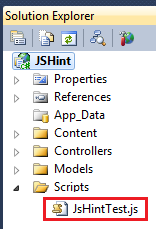
Complete project
Let's do Small Demonstration

JsHintTest.js


function averageWeight(weights) {
  var sum = 0, index;
  for (index = 0; index < weights.length; index += 1) {
       sum += weights[index];
  }
   return sum / weights.length;
}

var myAverageWeight = averageWeight([1.75, 1.78, 1.82]);
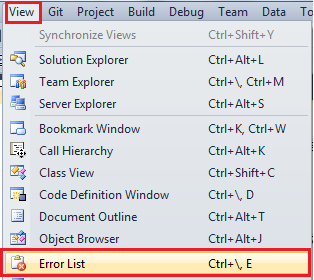
Then Click View ==> Error List on Visual Studio 2010 Menu

Error List on Visual Studio 2010 Menu


After that, change the above function's Name as average and Parameter as values

JsHintTest.js file with Changes (with Errors)

function average(values) { // <-- This is the only line has been changed
    var sum = 0, index;
    for (index = 0; index < weights.length; index += 1) {
        sum += weights[index];
    }
    return sum / weights.length;
}

var myAverageWeight = averageWeight([1.75, 1.78, 1.82]);

  • Then try to Save (Ctrl+S) the JsHintTest.js file
  • After that It will show all the Errors are as below

Errors

You can see all the mistakes which you did by using JSHint very easily.

Would You Like to Test Your JS Code Online ?


Do You Need to Know More about JSHint ?


Conclusion
  • JSHint is best when you’re writing fresh new code
  • It needs a bit of configuration to give the best results
  • JSHint is reliable and sophisticated Tool for find errors on JavaScript code files
  • You could use JSHint for enforces some basic code style consistency rules 

I hope this helps to You.Comments and feedback greatly appreciated.

If you feel it was a good article,Give me a +1.Thank You.


Happy Coding.


Sunday, March 10, 2013

How to Create a Custom Action Filter for MVC 3 ?

What is an Action Filter ?
  • It's an Attribute
  • Could be applied on a particular Action
  • Could be applied on a Controller
  • It modifies the way Action Executes
  • An Action Filter is a class that inherits from the FilterAttribute base class
  • Filters are used to inject an extra logic into the MVC request processing
  • Filters to define logic which is used to apply add-on functionality to the application
  • e.g. defining Authorization, Caching, Logging, Exception etc.

What are the Types of Action Filters ?

Types of Action Filters


What is 1-2-3-4 ?
  • If an Action Method has more than One Action Filter applied,
  • Then the order in which they are executed
  • i.e. Action Filters are Executed in the order 1-2-3-4 
  • Firstly Executes Authorization Filters
  • Lastly Executes Exception Filters


Authorization FilterWhat is an Authorization Filter ?
  • These filters are always run first before any other filters
  • They implement IAuthorizationFilter interface
  • Provides AuthorizeAttribute as the default class implementation

How to Do That ?

MyAuthorizationFilterAttribute.cs

using System.Web.Mvc;

namespace CustomActionFilter.CustomActionFilters
 {
 public class MyAuthorizationFilterAttribute:FilterAttribute,IAuthorizationFilter
  {
      public void OnAuthorization(AuthorizationContext filterContext)
      {
          if (filterContext.HttpContext.Request.IsAuthenticated)
          {
              //The action filter logic
          }
      }
  }
}


HomeController.cs

using System.Web.Mvc;
using CustomActionFilter.CustomActionFilters;

namespace CustomActionFilter.Controllers
{
    public class HomeController : Controller
    {
        [MyAuthorizationFilter]
        public ActionResult Index()
        {
            ViewBag.Message = "Welcome to ASP.NET MVC!";

            return View();
        }
    }
}

Action Filter
What is an Action Filter ?
  • It Implements IActionFilter interface
  • It Executes before and after action result is executed
  • Provides ActionFilterAttribute as the default class implementation

How to Do That ?

MyActionFilterAttribute.cs

using System.Web.Mvc;

namespace CustomActionFilter.CustomActionFilters
{
    public class MyActionFilterAttribute : FilterAttribute, IActionFilter
    {
        public void OnActionExecuting(ActionExecutingContext filterContext)
        {
            //The action filter logic - before
        }

        public void OnActionExecuted(ActionExecutedContext filterContext)
        {
            //The action filter logic - after
        }
    }
}

HomeController.cs

using System.Web.Mvc;
using CustomActionFilter.CustomActionFilters;

namespace CustomActionFilter.Controllers
{
    public class HomeController : Controller
    {
        [MyActionFilter]
        public ActionResult Index()
        {
            ViewBag.Message = "Welcome to ASP.NET MVC!";

            return View();
        }
    }
}

Result FilterWhat is a Result Filter ?
  • It Implements IResultFilter interface
  • It Executes before and after action result is executed

How to Do That ?

MyResultFilterAttribute.cs

using System.Web.Mvc;

namespace CustomActionFilter.CustomActionFilters
{
    public class MyResultFilterAttribute : FilterAttribute, IResultFilter
    {
        public void OnResultExecuting(ResultExecutingContext filterContext)
        {
            //The action filter logic - before
        }

        public void OnResultExecuted(ResultExecutedContext filterContext)
        {
            //The action filter logic - after
        }
    }
}

HomeController.cs

using System.Web.Mvc;
using CustomActionFilter.CustomActionFilters;

namespace CustomActionFilter.Controllers
{
    public class HomeController : Controller
    {
        [MyResultFilter]
        public ActionResult Index()
        {
            ViewBag.Message = "Welcome to ASP.NET MVC!";

            return View();
        }
    }
}


Exception FilterWhat is an Exception Filter ?
  • It Implements IExceptionFilter interface
  • It Executes only if exception is thrown by action method or an action result
  • Provides HandleErrorAttribute as the default class implementation

How to Do That ?

MyExceptionFilterAttribute.cs

using System.Web.Mvc;

namespace CustomActionFilter.CustomActionFilters
{
    public class MyExceptionFilterAttribute : FilterAttribute, IExceptionFilter
    {
        public void OnException(ExceptionContext filterContext)
        {
            if (filterContext.Exception != null)
            {
                //The action filter logic
            }
        }
    }
}

HomeController.cs

using System.Web.Mvc;
using CustomActionFilter.CustomActionFilters;

namespace CustomActionFilter.Controllers
{
    public class HomeController : Controller
    {
        [MyExceptionFilter]
        public ActionResult Index()
        {
            ViewBag.Message = "Welcome to ASP.NET MVC!";

            return View();
        }
    }
}


Note :

  • I have used VS 2010 with Asp.Net MVC 3 and C# for develop above code samples.


CustomActionFilter's Project Tree is as below :

Complete project


Finally, the HomeController with All the Custom Action Filters are as below :

using System.Web.Mvc;
using CustomActionFilter.CustomActionFilters;

namespace CustomActionFilter.Controllers
{
    public class HomeController : Controller
    {
        [MyAuthorizationFilter]
        [MyActionFilter]
        [MyResultFilter]
        [MyExceptionFilter]
        public ActionResult Index()
        {
            ViewBag.Message = "Welcome to ASP.NET MVC!";

            return View();
        }
    }
}

That's It.You're Done. 

Do you need to Download this Sample Project ?


Download

Conclusion
  • Action Filters allow you to do some extra pre or post processing to be carried out,in addition to the code written in the action methods
  • Depending on your need you can implement IAuthorizationFilter, IActionFilter, IResultFilter or IExceptionFilter interfaces to make your filter an Authorization filter, Action filter, Result filter or Exception filter respectively
  • These interfaces decide the order in which the action filters are executed
  • Which makes your application more flexible and maintainable


I hope this helps to You.Comments and feedback greatly appreciated.

If you feel it was a good article,Give me a +1.Thank You.


Happy Coding.


You Might Also Like

How to Improve ASP.Net MVC 3 View Performance ?
How to Use ViewModel with ASP.NET MVC ?
How to use Asp.Net MVC TempData Properly ?