- Knockout is a JavaScript Library
- Which helps the creation of rich, desktop-like web UIs
- It simplifies user interactions and makes interfaces fully responsive to any data source changes
- Knockout provides a simple two-way binding mechanism to link a data model to an UI,
- Thus making synchronization between them a breeze
What are the Key Concepts of Knockout ?
1. Declarative Bindings
- These allow you to connect parts of your UI to your data model in a simple and convenient way
- With declarative bindings even if you change the DOM all bound pieces stay connected
- You can bind data to a DOM by simply including a data-bind attribute to any DOM element

2. Automatic UI Refresh

3. Dependency Tracking
- Every time when your model data has changed all parts associated with it automatically being updated
- No need to worry about adding event handlers and listeners
- All that extra work is performed internally by Knockout and observables,
- Which notify listeners when underlying values have changed

4. Templating
- when your application becomes more complex and you need a way to display a rich structure of view model data,thus keeping your code simple
- Knockout has a native, built-in template engine which you can use right away
- But if you want, a third-party template engine, like jquery.tmpl or Underscore, also can be used

More Features of Knockout

How to Download Knockout ?


Step 3

How to work with Knockout ?
1. You have to add a reference to the "knockout-2.2.0.js" File which you downloaded
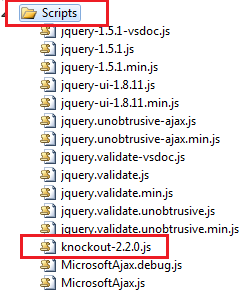
2. Then You have to add Reference to above file inside your master file
i.e. Inside \Views\Shared\_Layout.cshtml
<script src="@Url.Content("~/Scripts/knockout-2.2.0.js")" type="text/javascript"></script>
That's it.Your done.
Lets try with some basic capabilities of Knockout
- ASP.Net MVC 3 and Visual Studio 2010 has been used
- ASP.Net MVC 3 and Visual Studio 2010 has been used
CASE 1 :
- For that you can use data-bind attributes
View's Code
<!-- This is a View - HTML markup that defines the
appearance of your UI -->
<p>First name: <strong data-bind="text: firstName"></strong></p>
<p>Last name: <strong data-bind="text: lastName"></strong></p>
<script type="text/javascript">
//This is a
simple Viewmodel
//JavaScript
that defines the data and behavior of your UI
function
AppViewModel() {
this.firstName
= "Sampath";
this.lastName
= "Lokuge";
}
//Activates
knockout.js
ko.applyBindings(new
AppViewModel());
</script>

CASE 2 : How to Make the data Editable (Dynamic Data) ?
- That's why Knockout has a concept of observables
- These are properties that automatically will issue notifications whenever their value changes
i.e.
- Not only that the underlying ViewModel data is being updated when you edit ,
- But that all associated UI is updating in Sync with it too
View's Code
<!-- This is a View - HTML markup that defines the
appearance of your UI -->
<p>First name: <strong data-bind="text: firstName"></strong></p>
<p>Last name: <strong data-bind="text: lastName"></strong></p>
<p>First name:<input data-bind="value: firstName" /></p>
<p>Last name:<input data-bind="value: lastName" /></p>
Javascript Code
<script type="text/javascript">
//This is a
simple Viewmodel
//JavaScript
that defines the data and behavior of your UI
function
AppViewModel() {
this.firstName
= ko.observable();
this.lastName
= ko.observable();
}
//Activates
knockout.js
ko.applyBindings(new
AppViewModel());
</script>
Output

CASE 3 : How to Define Computed Values ?
- To handle this, Knockout has a concept of Computed Properties
- These are observable (i.e., they notify on change)
- And they are computed based on the values of other observables
View's Code
<!-- This is a View - HTML markup that defines the
appearance of your UI -->
<p>First name: <strong data-bind="text: firstName"></strong></p>
<p>Last name: <strong data-bind="text: lastName"></strong></p>
<p>First name:<input data-bind="value: firstName" /></p>
<p>Last name:<input data-bind="value: lastName" /></p>
<p>Full name: <strong data-bind="text: fullName"></strong></p>
<script type="text/javascript">
//This is a
simple Viewmodel
//JavaScript
that defines the data and behavior of your UI
function
AppViewModel() {
var
self = this;
self.firstName = ko.observable();
self.lastName = ko.observable();
self.fullName = ko.computed(function () {
return
self.firstName() + " " +
self.lastName();
});
}
//Activates
knockout.js
ko.applyBindings(new
AppViewModel());
</script>
Output

- Need to add a capitalizeLastName function to the viewmodel
- To Read or Write an observable's value, you have to call it as a function
View's Code
<!-- This is a View - HTML markup that defines the
appearance of your UI -->
<p>First name: <strong data-bind="text: firstName"></strong></p>
<p>Last name: <strong data-bind="text: lastName"></strong></p>
<p>First name:<input data-bind="value: firstName" /></p>
<p>Last name:<input data-bind="value: lastName" /></p>
<p>Full name: <strong data-bind="text: fullName"></strong></p>
<button data-bind="click: capitalizeLastName"> Go CAPS </button>
<script type="text/javascript">
//This is a simple Viewmodel
//JavaScript that defines the data and behavior of your UI
function AppViewModel() {
var self = this;
self.firstName = ko.observable();
self.lastName = ko.observable();
self.fullName = ko.computed(function () {
return self.firstName() + " " + self.lastName();
});
self.capitalizeLastName = function () {
var currentVal = self.lastName();//Read the current value
self.lastName(currentVal.toUpperCase());//Write back a modified value
};
}
//Activates
knockout.js
ko.applyBindings(new
AppViewModel());
</script>
Output

Small discussion about Knockout on stackoverflow, Which I have involved
What has Said Creator of Knockout about This Article ?

Conclusion
- This is a very basic example, but it illustrates some of the key points of Knockout
- You've got a clean, object-oriented representation of your UI's data and behaviors (your viewmodel)
- Separately, you've got a declarative representation of how it should be displayed visibly (your view)
- You can implement arbitrarily sophisticated behaviors just by updating the viewmodel object
- You don't have to worry about which DOM elements need to be changed,added or removed ,
- The framework can take care of synchronizing things for you
I hope this helps to You.Comments and feedback greatly appreciated.
If you feel it was a good article,Give me a +1.Thank You.


